
Digital Wallet1.0.5 - Google Play
You'll be able to see results in few seconds.
Publisher Description
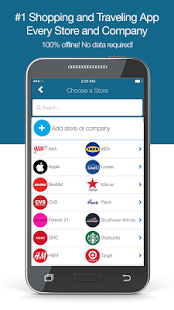
Worlds First and Only Digital Wallet for Shopping and Traveling!
Full list of what users are saving, sharing and using in ShopStore below.
SHOPSTORE IS EASY TO USE & SECURE:
- Completely Offline
- No Ads & No in-app purchases
- No Internet, Data or WiFi necessary
- No registration, email or personal information required
Never carry or track another piece of information! Simply store it securely with a quick picture in ShopStore and access it when you want!
★ SHOPPING
• Membership Cards
• Loyalty Cards
• Rewards Cards
• Club Cards
• Store Cards
• Receipts
• Coupons
• Gift Cards
• Shopping Reminders
• Friend + Family Share
• Checkouts, returns and exchanges are quick!
★ TRAVELING
• Boarding Passes
• Baggage Claim Tags
• Driver Details/Rental Car Info
• Frequent Flyer Miles
• Hotel Information
• Travel Notes/Reminders
• Pictures
• Friend + Family Share
• Travel with all your information in one place!
★ ADDITIONAL
• Insurance Cards
• Car Insurance Info
• Event Tickets
• AAA Cards
• Gym Cards
• Library Cards
• Amusement Park Passes
• Sending/Receiving Gift Cards
• Picture Reminders
• Picture Sharing
• Friend + Family Share
• Save whatever makes your life easier!
★ Watch our YouTube Demo and follow us:
• YouTube: https://goo.gl/XwMmmb
• Instagram: https://www.instagram.com/shopstore_app/
OUR DONATIONS
You Download ShopStore Donates!
GooglePlay:
Membership Cards, Rewards Card App, Reward Card App, Loyalty Card App, Loyalty Card Wallet, Club Card Keeper, Mobile Gift Card Wallet, Coupon App, Coupon Wallet, Receipts Manager, Receipts App, Card Storage App, Traveling Organizer, Digital Storage Organizer, Digital Organizer, Digital Wallet, Virtual Shopping & Traveling Organizer.
CONTACT US & FOLLOW US:
See user profiles on our Instagram
➠ Instagram: https://www.instagram.com/shopstore_app/
➠ Website: http://goo.gl/wH4IK1
➠ YouTube: https://goo.gl/XwMmmb
©ShopStore 2015-2016 - All Rights Reserved Patents Pending
About Digital Wallet
The company that develops Digital Wallet is ShopStore. The latest version released by its developer is 1.0.5.
To install Digital Wallet on your Android device, just click the green Continue To App button above to start the installation process. The app is listed on our website since 2016-03-30 and was downloaded 0 times. We have already checked if the download link is safe, however for your own protection we recommend that you scan the downloaded app with your antivirus. Your antivirus may detect the Digital Wallet as malware if the download link to com.shopstore.app is broken.
How to install Digital Wallet on your Android device:
- Click on the Continue To App button on our website. This will redirect you to Google Play.
- Once the Digital Wallet is shown in the Google Play listing of your Android device, you can start its download and installation. Tap on the Install button located below the search bar and to the right of the app icon.
- A pop-up window with the permissions required by Digital Wallet will be shown. Click on Accept to continue the process.
- Digital Wallet will be downloaded onto your device, displaying a progress. Once the download completes, the installation will start and you'll get a notification after the installation is finished.
Program Details
System requirements
Download information
Pricing
Version History
version 1.0.5
posted on 2016-03-30
- When adding a store, the list of stores shouldn't scroll left and right when scrolling down, also scrolling should be smoother.,- After Deleting a store and using the back button, you were taken to the wrong page.
Disclaimer
Official Google Play Link
We do not host Digital Wallet on our servers. We did not scan it for viruses, adware, spyware or other type of malware. This app is hosted by Google and passed their terms and conditions to be listed there. We recommend caution when installing it.
The Google Play link for Digital Wallet is provided to you by apps112.com without any warranties, representations or guarantees of any kind, so access it at your own risk.
If you have questions regarding this particular app contact the publisher directly. For questions about the functionalities of apps112.com contact us.
